
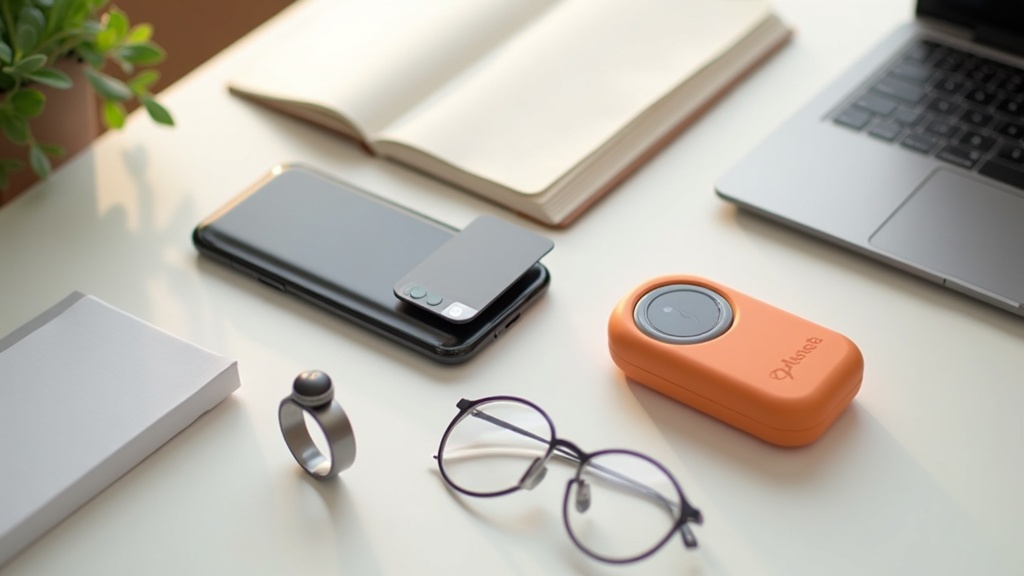
Why the AI Gadget Market Is Accelerating in 2026
“A smartphone is all you need” — that era is quietly coming to an end. From 2025 into 2026, the dedicated AI gadget market has been expanding rapidly, and behind that growth lies not just a passing trend, but a genuine technological inflection point.
Two major factors are driving this shift. The first is the miniaturization and reduced power consumption of edge AI chips; the second is the lightweighting of LLMs (large language models). Together, these advances have enabled a new wave of devices capable of sophisticated AI processing without relying on a smartphone at all.
Why dedicated devices are in demand right now
Smartphones are great entry points for AI assistants, but as long as they require you to hold them in your hand and stare at a screen, their usefulness has a ceiling. For tasks like audio recording, health monitoring, and information gathering, a purpose-built device simply delivers a better experience — and that’s where the market opportunity lies.
Breaking Free from Smartphone Dependency: The Rise of Standalone AI Devices
Standalone AI devices are AI-powered gadgets that operate independently, without relying on a smartphone. This category includes AI voice recorders, smart rings, and dedicated AI handheld devices.
Consider the difference between setting your phone on a conference table to record a meeting versus wearing a 16.6g wearable device that nobody notices. The impression you make on others — and your own ability to focus — is worlds apart. When a dedicated device fades into the background, it becomes possible to integrate AI into your daily workflow in a far more natural way.
Primary use cases for standalone AI devices
- Voice and meeting recording: Automated meeting minutes, speaker identification, multilingual support
- Health and sleep tracking: Continuous monitoring of heart rate, body temperature, and sleep scores
- Information processing and task execution: AI agent-driven automation, search assistance
These are all areas that smartphones have traditionally covered, but dedicated devices win on accuracy, battery life, and wearability precisely because they focus on doing one thing well. Narrowing the scope is itself a design philosophy — one that raises the quality of the experience.
Why Edge AI vs. Cloud AI Processing Is the Key to Choosing the Right Product
One factor that often gets overlooked when choosing an AI device is where the AI processing actually happens. Broadly speaking, there are two approaches: edge AI processing (handled entirely on the device) and cloud AI processing (sent to a remote server for computation).
| Edge AI Processing | Cloud AI Processing | |
|---|---|---|
| Where it runs | On the device | On external servers |
| Offline support | Yes | Requires connectivity |
| Privacy | High (no external transmission) | Depends on design |
| Processing power | Limited | High (LLMs, etc.) |
| Battery consumption | Low | Higher due to data transmission |
For example, the Samsung Galaxy Ring processes and stores sensor data on-device, then syncs with Galaxy AI for deeper analysis — a hybrid approach. By contrast, the PLAUD NOTE series leverages cloud processing for its transcription and summarization features, which is how it achieves high accuracy across 112 languages.
In short, ask yourself three questions before buying: “Do I handle sensitive or confidential information?” “Will I need to use this offline?” “How advanced does the processing need to be?” These are your starting points for finding the right AI gadget. Since processing architecture is rarely spelled out in spec sheets, check the official website and reviews ahead of time.
Key questions to answer before choosing a product
- Will you primarily use it online or offline?
- Will it handle sensitive data like meeting content or health information?
- Do you need it to work independently, or is smartphone integration acceptable?
- Does the battery life fit your daily routine?
5 Things to Look for When Choosing an AI Gadget
As of 2026, the options in the AI gadget space are expanding at a rapid pace. But have you ever bought something and ended up never using it? Unlike general-purpose devices like smartphones, most AI gadgets are built around a specific use case. Choose the wrong one and it won’t fit into your workflow — leaving you with an expensive device collecting dust.
Keep these five criteria in mind to find a device that genuinely fits the way you work.
- Defining your use case (what do you want to automate?)
- Japanese language accuracy
- Privacy policy and data handling practices
- Practical battery life and portability
- Total cost of ownership, including subscriptions
How to Define Your Use Case by Working Backward from What You Want to Automate
The first question to ask when choosing an AI gadget is: “Which tasks are eating up my time?” If writing meeting notes takes you 30 minutes or more every time, a device focused on recording and transcription should be at the top of your list. If your goal is ongoing health monitoring or sleep analysis, a passive sensing device like a smart ring is the better fit.
The AI gadget market divides broadly into two types: active input devices and passive sensing devices. The former — like the Rabbit r1 or PLAUD NotePIN — deliver value when the user consciously engages with them. The latter — like the Samsung Galaxy Ring — quietly collect data in the background just by being worn. Buying without understanding this distinction means ending up with a device that doesn’t match how you actually live and work.
Choosing by use case: a quick reference
| Primary Use Case | Best Device Type | Examples |
|---|---|---|
| Meeting and interview transcription | Recording-focused AI device | PLAUD Note Pro / NotePin |
| Health and sleep tracking | Passive sensing wearable | Samsung Galaxy Ring |
| Task automation and information search | Standalone AI device | Rabbit r1 |
Visualizing exactly how a device fits into your workflow before buying dramatically reduces post-purchase regret. For instance, a clear routine like “record three internal meetings per week and review AI summaries when I get back to the office” gives you something concrete to work from — and that kind of clarity makes it far more likely you’ll actually keep using the device.
How to Check Japanese Language Accuracy and Privacy Policies
Two factors that are easy to overlook when using AI gadgets in a Japanese-language environment are the quality of Japanese language processing and where your data is stored. Both should be verified before you buy.
When it comes to Japanese support, simply seeing “Japanese” in the list of supported languages isn’t enough. The PLAUD NOTE series, for example, advertises support for 112 languages — but real-world accuracy can vary noticeably with strong regional accents or industry-specific jargon. If possible, test the device yourself; otherwise, check review videos or hands-on tests from trusted tech publications before committing.
On the privacy front, most AI gadgets are architecturally designed to send voice or biometric data to the cloud. This is necessary to run the high-accuracy inference that on-device processing can’t yet handle alone — but it’s worth paying extra attention when the data includes confidential business information.
If you plan to use the device for confidential business meetings or in sensitive fields like healthcare or legal work, look for a device that offers a local-storage-first option for peace of mind.
Compare Using Total Cost of Ownership, Including Subscriptions
AI gadget pricing typically reflects the hardware alone, making it easy to underestimate the real ongoing cost. Before buying, make it a habit to calculate the total cost over one year.
Most AI recording and transcription devices require a monthly subscription to run high-accuracy cloud processing. Even if a device looks affordable based on sticker price alone, adding up annual subscription fees can make the total cost higher than expected. Conversely, a device with a higher upfront cost but no subscription — or a plan with few meaningful restrictions — can come out ahead over time.
How to estimate total cost of ownership
- Hardware price: Consider whether you’re paying upfront or in installments, and account for exchange rate risk on imported products
- Monthly subscription: Check the free tier limits and what the paid plan actually unlocks
- Connected app and service costs: Confirm whether integrations with tools like Notion or Slack are free or paid
- Consumables and warranty: Check availability of replacement batteries and extended warranty options
To put this in concrete terms: the PLAUD NotePin has a hardware price of approximately ¥27,500–¥28,000, plus ongoing subscription fees for transcription and summarization. Check the official website for current plan details and pricing. On the other end of the spectrum, the Samsung Galaxy Ring carries a higher hardware price (¥63,690), but Galaxy AI features are available at no additional cost for Galaxy device users.
Estimating how many hours per month you’ll actually use the device — and which features you’ll realistically rely on — before committing to a plan helps avoid overspending. Make the most of any free trial period, integrate the device into your real workflow, and then decide whether to continue.
Top 5 Products: Side-by-Side Comparison
Using the five evaluation criteria outlined in the previous section — use case, integration, privacy, battery life, and Japanese language support — we compare all five products across the board. Since prices range widely from around $200 to $450+, getting a high-level overview here before diving into the detailed sections will help you narrow down your options faster.
Quick-Reference Spec Table (Price Range, Language Support, App Integration)
The table below includes only verified specifications. “—” indicates information that could not be confirmed from official sources. Always check the latest official product pages before purchasing.
| Product | Price (tax included) | Category | Battery Life | Japanese Support | Key Integrations |
|---|---|---|---|---|---|
| PLAUD Note Pro | ¥30,800 | AI Voice Recorder | Up to 50 hours (extended mode) | ◎ (112 languages) | PLAUD dedicated app |
| PLAUD NotePin | ¥27,500–¥28,000 | Wearable Recorder | 20 hrs continuous · 40-day standby | ◎ (112 languages) | PLAUD dedicated app |
| Samsung Galaxy Ring | ¥63,690 | Smart Ring | Up to 7 days | ◎ | Galaxy Health · Samsung Health |
| Rabbit r1 | $199 (approx. ¥29,000) | AI Companion Device | Check official site | △ (see official site for details) | rabbit OS · LAM-based |
| Meta Ray-Ban Smart Glasses | Check official site for pricing | AI Smart Glasses | Check official site | △ (see official site for details) | Meta AI · Instagram · Spotify |
How to read the Japanese support column
◎ means transcription and UI are both supported at a practical level. △ means partial UI support or limited voice recognition accuracy. Overseas AI devices are structurally at a disadvantage for Japanese natural language processing, as their training data contains significantly less Japanese content than English — which leads to noticeable accuracy gaps.
User-Type Recommendation Matrix (Business Use vs. Life Logging)
The best fit depends heavily on how you plan to use the device. Even among AI gadgets, the ideal choice looks completely different depending on whether you’re recording meetings or tracking your daily health data.
| Product | Business Use | Life Logging | Best For | Watch Out For |
|---|---|---|---|---|
| PLAUD Note Pro | ★★★★★ | ★★☆☆☆ | Professionals with frequent meetings, interviews, or client calls | Designed for audio quality and features over portability |
| PLAUD NotePin | ★★★★☆ | ★★★★☆ | Users who want to log conversations throughout the entire day | Cloud-dependent — limited functionality in offline environments |
| Samsung Galaxy Ring | ★★☆☆☆ | ★★★★★ | Anyone looking to track sleep, activity, and health data long-term | Designed around Samsung devices — some features limited on other platforms |
| Rabbit r1 | ★★★☆☆ | ★★★☆☆ | AI enthusiasts who want to reduce smartphone dependency | Japanese support maturity and long-term service viability need verification |
| Meta Ray-Ban Smart Glasses | ★★★☆☆ | ★★★★☆ | Users who want hands-free AI search and photo logging as part of daily life | Japan availability and supported languages — check the official site |
One key takeaway from this matrix: PLAUD Note and Samsung Galaxy Ring target completely different users. The former is built around capturing and organizing information; the latter around measuring and analyzing physical data. That fundamental design philosophy difference maps directly onto who each device is made for.
Decision guide when you’re not sure which to pick
- Maximizing efficiency in meetings and business calls → PLAUD Note Pro (prioritizes recording quality and summary accuracy)
- Need all-day logging with minimal bulk → PLAUD NotePin (ultralight at 16.6g)
- Long-term health data tracking → Samsung Galaxy Ring (7-day battery and water resistance)
- Want a smartphone-free AI experience → Rabbit r1 (unique LAM-powered architecture)
- Want AI built into your glasses → Meta Ray-Ban Smart Glasses (check official site for Japan availability)
The following sections break down each product in detail — specs, real-world workflow use cases, and honest drawbacks. Feel free to jump directly to whichever product caught your eye in the comparison table above.

#1 PLAUD NOTE — The Gold Standard for Meeting Recording + AI Summarization
Sound familiar? You walk out of a meeting and spend the next hour or two writing up the minutes. The more packed the discussion, the harder it is to organize everything and pull out the action items. The PLAUD NOTE series has earned strong support among business professionals precisely because it solves that problem end-to-end — from recording to AI-powered processing — in one seamless workflow.
Released on October 14, 2025, the flagship PLAUD Note Pro is priced at ¥30,800. It features a 0.95-inch AMOLED display (up to 600 nits brightness) and supports up to 30 hours of continuous recording in enhanced audio mode, or up to 50 hours in extended battery mode. The wearable PLAUD NotePin weighs just 16.6g and delivers an impressive 20 hours of continuous recording with up to 40 days of standby.
How Magnetic Attachment and Smartphone-Back Placement Improve Recording Quality
If you’ve seen the original PLAUD NOTE’s magnetic-attachment-to-the-back-of-your-phone design, you might have wondered: why bother? The answer is straightforward — it uses the smartphone body as a resonance surface to amplify sound pickup. Vibrations from the table and voices from further away that a standalone recorder might miss are captured more clearly through the phone’s chassis.
The PLAUD NotePin takes a different approach, featuring a Knowles Sisonic™ microphone that delivers over 25dB of noise reduction. This physically filters out ambient noise like HVAC systems and café background chatter before the audio ever reaches cloud processing — a design philosophy focused on maximizing the quality of the raw data going in, which directly improves downstream transcription accuracy. Recording at up to 1536kbps Hi-Fi quality reinforces this commitment.
PLAUD NotePin Wearing Options (4 styles)
- Magnetic pin (shirt collar, chest pocket, etc.)
- Clip-on
- Wristband
- Neck strap
The flexibility to switch between wearing styles based on your outfit or activity is a big part of why it stays comfortable even during all-day use.
The Full Workflow: Transcription, Summarization, and Action Item Extraction via ChatGPT
Recordings sync to the PLAUD AI smartphone app and are processed in the cloud. With support for 112 languages, the system handles bilingual meetings mixing English and Japanese without any additional setup. Speaker identification separates each participant’s contributions, so the auto-generated minutes clearly show who said what — making accountability tracking straightforward.
From End of Meeting to Finished Minutes: The Processing Flow
- Stop recording → sync to app: Transfers to smartphone via Bluetooth
- Transcription: Whisper-based speech recognition runs in the cloud, supporting 112 languages
- Speaker identification: Generates a color-coded transcript separated by speaker
- Summary generation: ChatGPT integration automatically summarizes meeting highlights
- Action item extraction: Tasks and follow-ups are automatically compiled into a list
Step 5 — action item extraction — is where this tool earns its keep in real work environments. Missed tasks from a one-hour meeting are a leading cause of project delays. When AI drafts that list for you, you can focus your energy on reviewing and validating rather than remembering.
Honest Drawbacks
- Transcription and summarization require cloud processing, meaning audio data is sent to external servers. Before using this in sensitive internal meetings, verify compliance with your organization’s information security policy.
- AI processing features require a monthly subscription. Costs can add up depending on usage frequency — check the official site for current plan pricing.
- Audio quality depends on the recording environment. Accuracy may drop in large group meetings or rooms with significant echo or reverberation.
When you add up the time spent writing meeting minutes week after week, estimates suggest the average professional loses dozens of hours per year to this task alone. Given that, a one-time investment of around ¥30,000 is a defensible business decision. Check the official site for full plan details and supported languages before pulling the trigger.
PLAUD NOTE AI Voice Recorderの詳細スペックや実売価格が気になる方は、公式サイトで最新情報を確認してみてください。会議や取材の録音・文字起こし業務が多い方にとっては、導入コストを上回る時間短縮効果が期待できるでしょう。
[#2] PLAUD NotePin | Clip-On Wearable for Always-On Lifelogging
Have you ever wished you could capture not just meetings, but every conversation, idea, and insight throughout your day? The PLAUD NotePin is a wearable AI recorder built for exactly that kind of always-on recording. Weighing just 16.6g, it clips onto your clothing or wristband so you can wear it all day without a second thought.
If the #1-ranked PLAUD NOTE is a card-style recorder designed for meetings — something you stick to your phone — then the NotePin is better described as a proactive lifelogging tool. Same PLAUD family, but a very different use case and target user.
The PLAUD NotePin automatically transcribes and summarizes recordings using AI. Check the official website for full specs and current pricing.
On-Device Storage vs. Cloud Upload: A Flexible Architecture
The technical core of the NotePin is its combination of 64GB local storage and Hi-Fi sound recording at up to 1536kbps. Audio is saved directly to the device first, and you decide when to upload it to the cloud for AI processing. This design — which doesn’t assume a constant internet connection — makes a lot of sense from a privacy standpoint.
Why the Privacy-First Design Matters
Unlike devices that stream audio to the cloud in real time, the NotePin prioritizes local storage. Giving users control over what gets uploaded and when is a meaningful differentiator — especially when recording sensitive business conversations or personal discussions.
The microphone uses a Knowles Sisonic™ element, delivering over 25dB of noise reduction. Knowles is a well-regarded mic manufacturer used in professional hearing aids and high-end earbuds, known for picking up voices clearly even in noisy environments. Battery life supports up to 20 hours of continuous recording, with a standby time of up to 40 days — more than enough for everyday use.
A Sample Daily Workflow for Lifelogging
Attach it with the clip or neck strap like a badge. Wear it through your commute and let it capture your thoughts and ideas as you head into the day.
In-person meetings, casual chats, and even off-the-cuff ideas get recorded continuously — no manual operation required, so nothing slips through the cracks.
Send the full day’s audio to the cloud in one batch and run AI transcription and summarization. With support for 112 languages and speaker identification, reviewing your day takes minimal effort.
The NotePin supports four wearing styles — magnetic pin, clip, wristband, and neck strap — making it easy to switch based on the occasion. It works just as naturally with a suit as it does with casual clothes.
Drawbacks to Keep in Mind
Always-on recording is convenient, but it does require consideration for those around you. Recording third-party conversations without consent may have legal and ethical implications depending on your location. Additionally, AI processing relies on the cloud, which may involve a separate subscription fee. Check the official website for details.
Pricing runs around $185–$190 USD, slightly less than the #1-ranked PLAUD NOTE (PLAUD Note Pro: approximately $205). If your goal is to capture not just meetings but your entire stream of thought and conversation throughout the day, the NotePin is likely the better fit. Check the official website for the latest availability and pricing.

PLAUD NotePinの詳細なスペックや対応言語、実際の録音精度が気になる方は、公式ページで最新情報を確認してみてください。価格や在庫状況もあわせてチェックできます。
[#3] Meta Ray-Ban Smart Glasses (2nd Gen) | The Best Entry Point into AI-Powered Eyewear
Ever felt like smart glasses are too conspicuous to wear at work? Meta Ray-Ban solves that problem by embedding the technology directly into Ray-Ban’s classic frames — so they look virtually indistinguishable from regular sunglasses. The biggest differentiator here is that you can use an AI device and go completely unnoticed, while still enjoying fully hands-free operation.
If you’re curious, check the official site for real-world usage details, supported features, available colorways, and pricing.
How Meta AI Conversations and Real-Time Information Work
Built-in microphones and open-ear speakers let you send voice queries directly to Meta AI. Just say “Hey Meta” and you can check your schedule, get translations, or search for information — all without ever pulling out your phone.
The standout feature is live translation. It pipes real-time translations of the other person’s speech directly into your ear, making it genuinely useful in meetings with non-English speakers or at international trade shows. No more fumbling with a translation app — the conversation keeps flowing naturally.
Key Features (Confirmed)
- Hands-free voice queries to Meta AI
- Live translation
- Hands-free photo and video capture via built-in camera
- Music playback and calls via open-ear speakers
- Natural everyday look with classic Ray-Ban frames
Hands-Free Use Cases for the Workplace
This device is especially well-suited for jobs that require both hands while still needing access to information — fieldwork, sales visits, customer service, and similar roles. For example, you can snap a photo of something on a site walkthrough and immediately add a voice memo, all in one seamless workflow.
Drawbacks & Things to Know
- No display — all feedback is audio only, so you can’t view visual information
- Meta AI performance depends on your network connection; it can be unreliable in areas with weak signal
- The open-ear speakers can be heard by those nearby in quiet environments — not ideal for confidential conversations
- Official availability, pricing, and supported languages in your region should be verified on the official site
Among smart glasses, Meta Ray-Ban is the most practical take on the idea of using an AI assistant as everyday eyewear. Without an AR display, it trades visual output for better battery life, lighter weight, and a completely natural look — making it the ideal first smart glasses for anyone who wants to dip their toes in. Check the official site for the latest specs, pricing, and supported features.

Ray-Ban Meta Smart Glassesの最新価格や詳細なスペックが気になる方は、ぜひ公式サイトや販売ページで確認してみてください。カラーバリエーションや在庫状況もあわせてチェックできます。
[#4] Samsung Galaxy Ring | How Good Is This AI Smart Ring for Health Tracking?
Ever noticed that wearing a smartwatch to bed affects your sleep quality — the pressure on your wrist just feels wrong? The Samsung Galaxy Ring addresses exactly that problem with a ring-form factor, offering a fresh alternative in the wearables market. A titanium ring weighing just 2.3–3.3g (depending on size), packed with near-medical-grade vital sensors — the design philosophy is to keep the device as invisible to daily life as possible.
How PPG Sensors and Accelerometers Measure Your Vitals
The inside of the Galaxy Ring houses three sensors: an optical heart rate sensor (PPG: photoplethysmography), an accelerometer, and a skin temperature sensor. PPG works by shining green LEDs onto the skin and detecting blood flow changes from how much light is reflected — a technology widely used in smartwatches. However, fingertips have a higher concentration of peripheral blood vessels than the wrist, which makes it easier to capture a cleaner, more stable signal.
The accelerometer tracks body movement across three axes, analyzing movement patterns during sleep such as turning over or motion associated with sleep apnea. The skin temperature sensor estimates fluctuations in core body temperature and is also used for predicting ovulation cycles for female users. Galaxy AI integrates data from all three sensors to calculate a comprehensive “Sleep Score” covering sleep depth, REM sleep, number of awakenings, and snoring detection.
The sensors are positioned on the inside of the ring (palm-facing side), designed to sit flush against the pad of your finger. An incorrect ring size will reduce measurement accuracy, so Samsung recommends using their official sizing guide before purchasing.
How to Use Your Sleep Score to Optimize Your Daily Performance
The real value of the data Galaxy Ring collects isn’t just health management — it’s translating that data into a daily performance plan. The morning “Energy Score” generated by Galaxy AI is calculated from the previous night’s sleep quality, heart rate variability (HRV), and body temperature changes, giving you a concrete indicator of how much you have in the tank for the day.
STEP 1: Check your Energy Score in the Galaxy Health app right after waking up
On low-score days, push deep-focus work (strategic planning, coding, writing) to the afternoon and fill your morning with email and routine tasks instead.
STEP 2: Review your score trends weekly
If your sleep score has been dropping consistently, treat it as a signal of chronic overload — use it as a prompt to reprioritize your task list or consider taking time off.
STEP 3: Use snoring data to improve your habits
Tracking the correlation between snoring frequency and next-day focus helps you pinpoint variables like pre-bedtime alcohol or pillow height.
Battery life lasts up to 7 days, and with 10ATM + IP68 water and dust resistance, you can wear it in the shower or while swimming without any issues. The low risk of missed measurements due to forgotten charging is a significant advantage when it comes to building a continuous, reliable dataset over time.
Honest Drawbacks: At $429.99, it’s on the pricier end for this category of device. Full functionality also requires pairing with a Samsung smartphone — iPhone users will find some features restricted. And as a ring, there’s no screen or vibration alerts of any kind; your phone always needs to be nearby.
For knowledge workers, managing your physical condition isn’t just a health conversation anymore — it’s a productivity conversation. The Galaxy Ring makes a strong case as a workflow optimization tool precisely because it tackles that challenge in the least intrusive way possible: a ring you barely notice you’re wearing. Visit the Samsung official site for full specs and a list of compatible Galaxy devices.
Samsung Galaxy Ringの最新価格や詳細スペックが気になる方は、公式ページでぜひ確認してみてください。健康管理とAI連携を一本のリングで完結させたい場合、選択肢として十分検討に値するデバイスといえます。
#5: Rabbit r1 — The Promise and Reality of a Standalone AI Companion Device
Have you ever wanted to simplify your smartphone experience, or just hand everything over to an AI? The Rabbit r1 was designed with exactly that vision in mind. Priced at $199, it generated massive buzz when it launched in 2024.
That said, to be upfront about it: the product is still a work in progress when it comes to delivering on its concept. That’s exactly why it’s worth understanding both how it works and where its current limits lie before making a judgment.
LAM vs. LLM: Why the Rabbit r1 Is Called an “Agentic” Device
Most AI tools you’re familiar with — like ChatGPT — are built on LLMs (Large Language Models). LLMs are designed to understand text and respond with text. The Rabbit r1 takes a different approach, using a LAM (Large Action Model).
The Core Difference Between LLM and LAM
- LLM: Explains what should be done in words — the human carries out the action
- LAM: Decides what needs to be done and autonomously executes the actions within apps
A LAM learns how humans interact with apps — screen transitions, button taps, navigation flows — and replicates those actions automatically. Say “Create a playlist of [artist] on Spotify,” and the AI opens the app, searches, and adds tracks on your behalf. That’s what makes it “agentic.”
On the hardware side, the r1 packs a 2.88-inch touchscreen, a MediaTek Helio P35 chip, 4GB of RAM, and 128GB of storage. It supports 4G SIM cards, making it a true standalone device — no smartphone required. A 360-degree rotating camera called the “rabbit eye” feeds visual context to the AI, letting it process instructions with an awareness of its surroundings.
For the latest pricing and availability on the Rabbit r1, check the official website. Full specs on its AI assistant features are listed there too, so it’s worth a look if you’re considering a purchase.
What It Can Do Now — and What to Expect from Future Updates
Reactions to the Rabbit r1 at launch were a mix of excitement and disappointment. This wasn’t primarily a technical failure — it came down to a gap between the concept and the execution.
What Works Right Now
Simple tasks like playing music, checking the weather, basic searches, and object recognition with the camera. Since it runs independently over Wi-Fi or 4G without needing a smartphone, it works best when treated as a secondary device with a defined, limited role.
Current Limitations
App support is still limited, which falls short of the original promise of controlling “any app.” LAM accuracy also varies depending on the task and context — the more complex the request, the higher the reported failure rate.
What Future Updates Could Bring
Rabbit has committed to ongoing OTA updates, and as supported services expand and LAM accuracy improves, the practical value of this agentic device should grow incrementally. For the latest roadmap details, check the official website.
The real significance of the Rabbit r1 isn’t its current polish — it’s the paradigm it introduces: an AI that crosses the UI barrier and acts on your behalf. As a genuine attempt to challenge the smartphone-centric ecosystem, its influence on the industry goes well beyond its price tag.
What to Know Before You Buy
It’s more realistic to think of the Rabbit r1 as an early-adopter experience with AI agentic devices rather than a fully finished product ready for daily use. A lot of the information circulating online still dates back to the 2024 launch, so be sure to check the official website for the latest supported features, pricing, and availability.
Rabbit r1の詳しいスペックや最新価格は公式サイトで確認できますので、気になる方はぜひチェックしてみてください。
How to Integrate AI Gadgets Into Your Workflow — A Practical Guide
As touched on in the Rabbit r1 section, AI gadgets are shifting from “concept” to “real-world use.” That said, even the most capable device becomes just another thing to manage if it doesn’t connect with your existing tools. Here, we’ll walk through specific integration workflows using representative devices for recording and health tracking.
PLAUD NOTE → Notion Auto-Sync: Eliminating Meeting Notes from Your To-Do List
Have you ever spent more time writing up meeting notes than the meeting itself took? That’s exactly the four-step manual process — record, transcribe, summarize, share — that the PLAUD NOTE series is designed to eliminate.
PLAUD Note Pro handles transcription in 112 languages, speaker identification, and automatic summary generation entirely on the device. This is made possible by seamless cloud API integration implemented at the firmware level — the moment the app receives your recording, processing kicks off in the background automatically.
PLAUD NOTE → Notion Integration Flow
- After recording ends, tap “Generate Summary” in the app (produces a per-speaker transcript log plus a summary text)
- Enable the Notion integration in the official PLAUD app (register your API key in the app settings)
- Configure your output template (pre-map fields like date, attendees, and action items)
- Hit “Send” — one tap automatically appends everything to your Notion database
One thing to keep in mind: transcription accuracy depends on your recording environment. The Knowles Sisonic™ microphone in the PLAUD NotePin delivers over 25dB of noise reduction, so you can expect solid accuracy in a conference room setting. Outdoors or in a noisy café, however, quality may drop — and whether the output is clean enough to share without proofreading really comes down to the environment. It’s worth being honest with yourself about that.
Pro Tip
Using Zapier or Make (formerly Integromat), you can extend this beyond Notion to automatically post summaries to Slack as well. A two-stage flow — “auto-forward the summary to your #meeting-notes Slack channel → team members check Notion for details” — can dramatically speed up how quickly information reaches your team.
If writing up meeting notes is a pain point for you, it’s worth checking out PLAUD NOTE’s recording and transcription quality firsthand. The official site also has full details on supported languages and app integrations.
Galaxy Ring + Google Calendar: Optimizing Your Schedule Around How You Actually Feel
Ever scheduled an important client meeting on a day when you slept terribly? The Galaxy Ring’s goal isn’t just to show you wearable data — it’s to connect that data to action.
The Galaxy Ring packs three sensors — an accelerometer, an optical heart rate sensor, and a temperature sensor — continuously tracking your sleep score, snoring patterns, and daytime activity levels. Weighing just 2.3 to 3.3 grams, it’s barely noticeable on your finger, and the battery lasts up to 7 days, which means fewer gaps in your data.
Health-Based Schedule Optimization Flow
- Check your sleep score in Samsung Health each morning (on low-score days, use this as a signal to push focus-heavy tasks to the afternoon)
- Build a Samsung Health → Google Calendar integration using Google Apps Script (GAS) (Samsung Health data is accessible via API — automatically log your sleep score in the calendar’s “notes” field)
- Use color-coding in your calendar (80+ = green / 60–79 = yellow / 59 and below = red for at-a-glance visibility)
- Review your data weekly and block off your peak-performance hours for creative or high-focus work
Keep in mind that Samsung Health’s API access scope and specs are subject to change, so for detailed implementation guidance, check the official Samsung Developer Portal for the latest information. The Galaxy Ring is fundamentally a data collection device — it hasn’t reached the point of automatically optimizing your schedule on its own. Building this workflow around the principle that humans make the final call based on their own data is what makes it sustainable long-term.
Principles for Designing Integrated Workflows
With any device, “outputting data” and “passing that data to another tool” are two separate things. PLAUD NOTE officially supports Notion integration out of the box, but connecting Galaxy Ring to Google Calendar requires custom implementation on your end. Before committing to a setup, get into the habit of confirming exactly how much of the automation is officially supported — it’ll save you a lot of wasted effort.
If you’re looking for an easy way to track health data with a ring-style wearable, it’s worth checking out the latest pricing and features for the Samsung Galaxy Ring. It’s noticeably lighter and less intrusive than a smartwatch, so if everyday wearability matters to you, it makes for a solid comparison point.
Wrap-Up | The AI Gadgets Worth Buying in 2026
The real return on investment from AI gadgets comes not from buying something because it looks cool, but from choosing a device based on the specific problem you need to solve. Here are our final recommendations organized around three key areas: meeting recording, lifelogging, and health tracking.
Final Picks by Use Case (Meeting Recording / Lifelogging / Health Tracking)
The reason people get stuck choosing between devices is that the features can seem to overlap. In practice, however, each product covers a clearly distinct set of scenarios. The table below breaks it down.
| Use Case | Recommended Device | Price | Why It Wins |
|---|---|---|---|
| Meeting Recording & Automated Minutes | PLAUD Note Pro | $199 | 0.95″ AMOLED display for on-the-spot status checks, up to 30 hours of recording, speaker identification + auto-summary for near-zero post-processing |
| Lifelogging & Always-On Capture | PLAUD NotePin | $179–$185 | Ultra-light 16.6g body, four wearing options, 20 hours of continuous recording so no idea or conversation slips through the cracks |
| Health Monitoring & Performance Tracking | Samsung Galaxy Ring | $399 | Titanium build at just 2.3–3.3g, 7-day battery life, sleep score + snore analysis for managing your daily performance |
The Rabbit r1 ($199) is a uniquely interesting device for experimenting with AI agent interactions, but given the state of its software as of late 2024, we recommend checking the official website for the latest information before making a purchase decision.
How to Choose Between the Two Recording Devices
If you’re torn between the two PLAUD devices, the deciding factor is simple: do you want a display or not? The PLAUD Note Pro is for people who want to visually confirm recording status on the spot. The PLAUD NotePin is for people who want to wear it and forget it’s there — a completely invisible presence.
How AI Gadgets Change Your Work Week: Before & After
Rather than talking about “efficiency gains” in the abstract, let’s look at how your Monday-through-Friday workflow actually changes — that makes it much easier to decide whether the investment is worth it.
Monday — Weekly Standup (60 min): You’re trying to take notes and listen at the same time. After the meeting, you spend another 30 minutes writing up the minutes — and anything you missed is just gone.
Wednesday — Ideas on the Go: You get a great idea on the train, but unlocking your phone and typing it out feels like too much effort. You let it go. Maybe 10% of your ideas ever get recorded.
Friday — End-of-Week Fatigue: You know your sleep hasn’t been great, but you can’t pinpoint why. You manage your energy levels purely by feel.
Monday — Weekly Standup (60 min): You set the PLAUD Note Pro next to your MacBook and hit record. The moment the meeting ends, a transcription in 112 languages and an auto-generated summary are ready to push to Notion. Meeting minutes take virtually no time. Speaker identification means you have a record of exactly who said what.
Wednesday — Ideas on the Go: Your PLAUD NotePin is clipped on via neck strap. You press one button to start recording. The Knowles Sisonic™ mic cuts ambient noise by up to 25dB for crystal-clear capture. Back at your desk, you just check Notion.
Friday — End-of-Week Fatigue: Your Samsung Galaxy Ring shows your sleep score and snore data every morning. You start noticing a pattern — your deep sleep tanks on certain nights — and trace it back to Thursday evening drinks. That insight changes how you make decisions.
What all these devices have in common is a design philosophy built around eliminating the effort of manual data entry. Traditional apps and services assumed you’d open them intentionally and actively use them. AI gadgets shift to a passive model — they record and analyze simply by being present. That shift is the real essence of workflow transformation.
Thinking About ROI
Say you’re in three meetings a week and you save 30 minutes of note-taking after each one. That’s roughly 6 hours back per month. When you calculate what those hours are worth at your own hourly rate, it becomes pretty clear how quickly the PLAUD Note Pro pays for itself. Don’t just look at the price tag — think about the value of the time you’re getting back.
AI gadgets are still a rapidly evolving market, and even in 2026, software updates can significantly change what a device is capable of. Before buying anything, make sure to check the manufacturer’s official website for the latest specs, pricing, and app compatibility.

Comments